
Free
Start managing your online reviews.
€0/ month excl. VAT
- Your Google reviews in one place
- No email or SMS
- Website option: €59 / month
No commitment
IndustriesHealthcare
With Doctolib, the review request goes out on its own after “seen”. Moodi prepares replies in a medical tone. Reception has nothing to click.
No commitmentAutomatic sending with Super and Ultra

Move your mouse and Moodi follows; click it and it says hello.
More than 250 users trust us







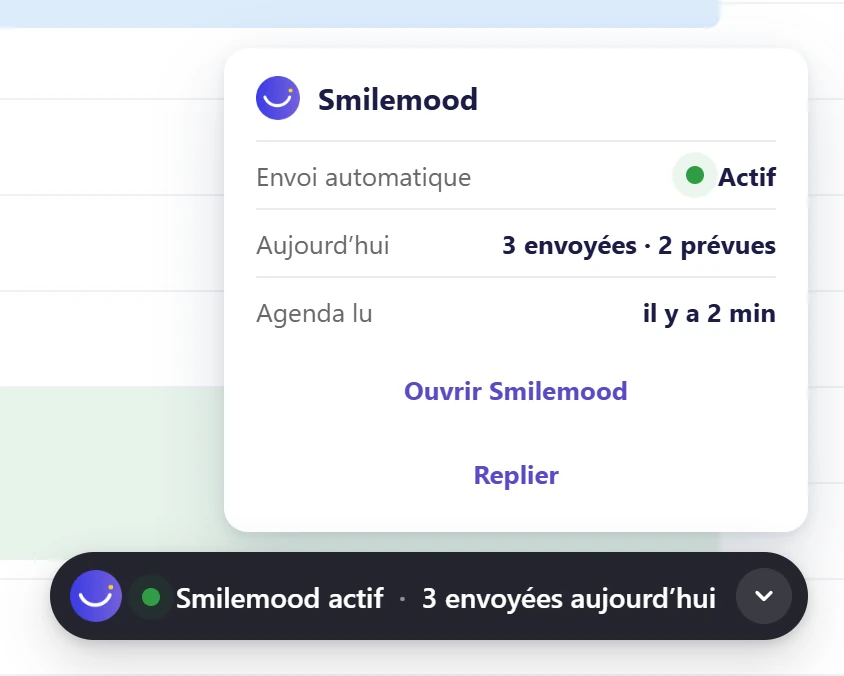
The extension takes care of it after each “seen”, and Moodi prepares the replies.
The Doctolib diary stays open in Chrome, the extension does the rest.
It reads the appointments marked “seen” in your Doctolib diary.
Straight away, 15 minutes, 1 hour, 3 hours, or in the evening at 7 pm. Nothing goes out before activation.
Moodi prepares in a medical tone, you read over each text.
 Inès M.Replied
Requests that go out on their own, careful replies, all your workstations in one place.
The Chrome extension spots the appointments marked “seen” in your Doctolib diary and sends the request. No-shows, cancellations and people who refused notifications receive nothing.
A public reply gives no treatment details. Moodi writes in that tone, and you read over each text.
A centre with several workstations links to a single account, and a group of practices sees where automatic sending is running and where it has stopped.
Three understated templates, your treatments, your practitioners and the link to your appointment booking.
Your satisfied patients will say so. 7 days free on Super and Ultra, no commitment.
Try Super for 7 daysMoodi suggests, you approve.
Nothing goes out without your approval, except what you have chosen to automate.
“Since we started using SmileMood, our practice has seen a real change. The qualified reviews we receive on Google My Business strengthen our credibility and attract new patients. The AI assistant Moodi helps us reply to comments in a personalised way, which is crucial in the medical field. An essential solution for any clinic!”
“Thanks to SmileMood, we have been able to strengthen Demeco’s reputation by collecting more customer reviews. The tool is simple and effective, and it lets us improve our customer relationship by responding to feedback in real time.”
“SmileMood is a valuable asset for Ikadran! It lets us continuously measure our patients’ satisfaction and build a lasting relationship of trust. An essential solution for professionals in the medical sector.”
One price per location, no commitment, 7 days free on Super and Ultra.
Start managing your online reviews.
No commitment
Your reviews, your Google Business Profile and Moodi
No commitment
Everything in Super, plus your website
No commitment
Another question? All the answers are sorted by topic, with a search field.
All questionsNo. The Smilemood extension for Chrome reads your Doctolib diary and sends the review request after the “seen” status. The diary must stay open in Chrome.
You choose: straight away, 15 minutes later (the recommended setting), 1 hour, 3 hours, or in the evening at 7 pm. It goes out between 9 am and 8 pm, Monday to Saturday, 50 per day at most. These limits can be changed.
Patients who did not attend, cancelled appointments and people who have refused notifications. The same appointment does not trigger two requests.
Appointments marked “seen”, with the patient’s first name, surname, email and phone number, to send them the review request.
They vary according to your professional body: check with it. A public reply must give no treatment details, and you read over each one.
It must not: a public reply gives no treatment details. You read over each text before publication.
To read before you start, and the features used most.